Incident Push
Register a callback to receive robot incident alerts in real time. Group customer push support has been added.
- Compatibility: Subscriptions created or re-saved on or after 2025‑05‑15 will adopt the new top-level field format as described in this document.
- Existing subscriptions remain in the original two-level format (
appId+payload) and are not affected. - New top‑level fields (siblings of
appIdandpayload).
Integration flow
Step 1: Configure the callback URL
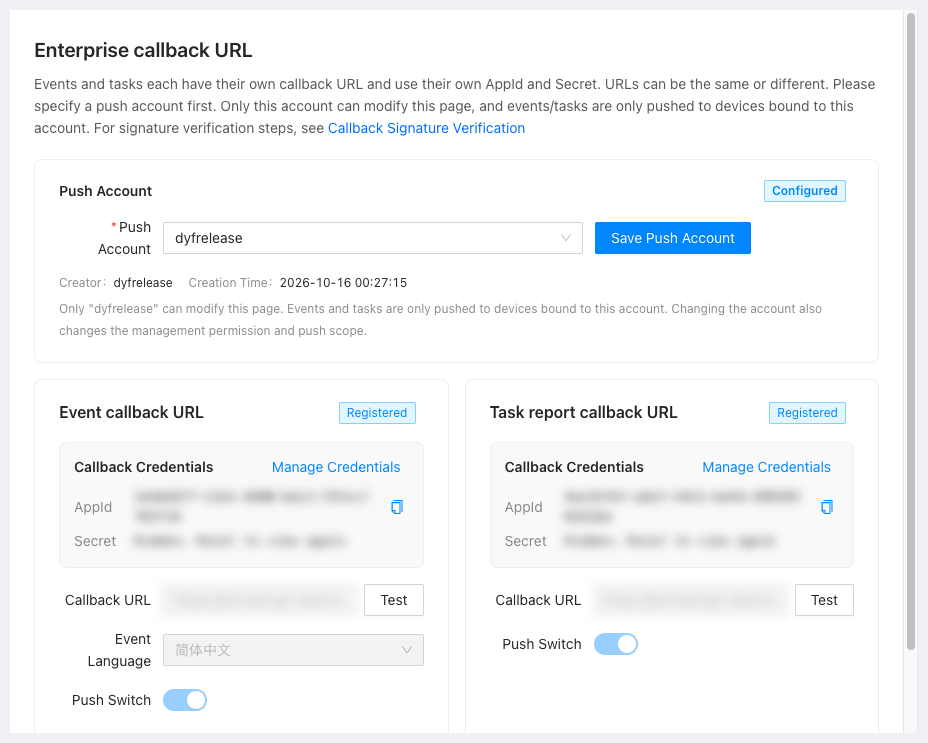
- Sign in to the Developer Center and open Enterprise callback URL. The page has two blocks, event callback URL and task report callback URL; this page covers the first one only.
- Choose the push account. It must be a developer of this customer and is the only person who can modify this page. It also determines the push scope: incidents are pushed only for robots directly bound to that account. Robots that belong to the customer but are not directly bound to the account are not pushed. The event and task callbacks share one push account.
- In the event callback block, click Modify, enter the callback
urland the event language, turn on the push switch, and click Save. - The platform then issues the
AppIdandSecretfor this subscription; find them under the credential section. TheSecretis shown again only after a reset, so save it immediately.
Step 2: Verify the signature
Each push carries X-Gausium-App-Id, X-Gausium-Timestamp, X-Gausium-Nonce and X-Gausium-Signature. Complete verification before parsing the body; the algorithm and examples are in Callback Signature.
Step 3: Test the connection
Click Test in the block and the platform sends one probe with payload.test = true to the configured URL. A 2xx response that passes verification means the link is working.
Step 4: Receive and process pushes
Once the link is up, parse incidents with the field table below. For the business decisions around them (pairing alarms with recoveries, which levels are delivered, how to cope with lost pushes), see How do I tell whether a fault has been resolved and Which incident levels are pushed.
V3 provides incident push only; there is no incident query endpoint. A lost push cannot be re-fetched, so persist received events on your side and treat them as the authoritative event history.
Callback Registration Requirements
-
Language: Must conform to IETF BCP 47 (e.g.,
en-US,zh-CN). -
Callback:
url, for example,https://{{host}}/callback, with HTTP POST method.appId, for example,24416c36-d9c7-4d74-a047-d6ca461fxxxx(used for authentication,Provided by Gausium after issuance).
Example (New Format)
curl -X POST "https://{{host}}/callback" \
  -H "Content-Type: application/json" \
  -d '{
    "appId": "24416c36-d9c7-4d74-a047-d6ca461fxxxx",
    "payload": {
      "serialNumber": "ITEST00-0000-000-XXXX",
      "modelTypeCode": "Scrubber 50H",
      "content": {
        "incidentCode": "20005",
        "incidentName": "Clean water full",
        "incidentLevel": "H2",
        "incidentId": "d3919667-a9ce-463e-8d3e-4203c89bddcx",
        "incidentStatus": 1,
        "startTime": "2026-03-26T00:17:25Z",
        "endTime": "",
        "taskId": null,
        "subTaskId": null,
        "taskInstanceId": "",
        "taskName": "Map cleaning",
        "mapId": "fc8101e8-626a-4a32-9ee6-c63d9871290x",
        "mapName": "Second floor",
        "navInstanceId": null,
        "navName": null
        }
    }
}'
Top-Level Field Descriptions
| Field | Type | Description |
|---|---|---|
appId | String | Used for authentication, unchanged |
payload | Object | Business data, same structure as in the previous version |
Parameter description:
| field name | field type | filed description | example |
|---|---|---|---|
| payload.serialNumber | String | robot serial number | "TEST00-0000-000-XXXX" |
| payload.modelTypeCode | String | robot model type code | "Scrubber 50H" |
| payload.content | Object | incident content | |
| payload.content.incidentCode | String | incident code | "1011" |
| payload.content.incidentName | String | incident name | "Clean water full" |
| payload.content.incidentLevel | String | incident level | "H2" |
| payload.content.incidentId | String | incident id | "c084a905-597e-4085-90dd-ecab697dxxxx" |
| payload.content.incidentStatus | int | incident status,1 alarm,0 recover | 1 |
| payload.content.startTime | String | incident start time. utc time zone | "2023-01-14T02:09:28Z" |
| payload.content.endTime | String | Incident end time,utc time zone. If the incident does not recover, end time is empty string | "2023-01-14T02:09:28Z" or "" |
| payload.content.taskId | String | The id of the task the robot is executing when the incident occurs. | "c084a905-597e-4085-90dd-ecab697dxxxx" |
| payload.content.subTaskId | String | The id of the subtaskid the robot is executing when the incident occurs. | "c084a905-597e-4085-90dd-ecab697dxxxx" |
| payload.content.taskInstanceId | String | The instance id of the task when the incident occurs. | "c084a905-597e-4085-90dd-ecab697dxxxx" |
| payload.content.taskName | String | The name of the task when the incident occurs. | "task1" |
| payload.content.mapId | String | The id of the map where the robot is located when the incident occurs. | "c084a905-597e-4085-90dd-ecab697dxxxx" |
| payload.content.mapName | String | The name of the map where the robot is located when the incident occurs. | "map1" |
| payload.content.navInstanceId | String | The navigation instance id that the robot was executing when the event occurred | "da4b1ca9-dbfe-4dd2-bcbe-715c00904f0b" |
| payload.content.navName | String | The name of the navigation point the robot was executing when the event occurred | "hop" |
| payload.content.incidentLevel: |
| value | name | description |
|---|---|---|
| H0 | event | It is not an alarm, but only an event notification |
| H1 | status | Buried point statistics |
| H2 | status | The routine state of the robot can be solved by the user without any guidance |
| H3 | warn | It does not affect the robot task. Users can solve |
| H4 | assistance, problem | It does affect the robot task. Users can solve |
| H5 | hidden danger | It does not affect the robot task. Users can not solve |
| H6 | fault | It does affect the robot task. Users can not solve |
| H7 | quality issues | Serious failure |